
Skip to content
實驗性

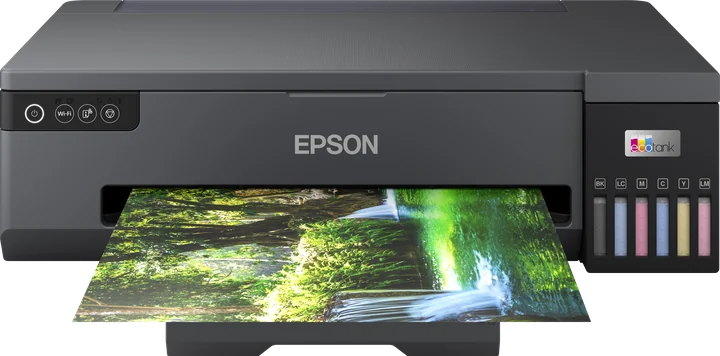
Epson L18050 / ET-18100 as an A3+ dye film printer

實驗性Epson EcoTank L18050

Zorofilm 有列印設定檔,但其噴頭資料借用自最接近的機型或標示為實驗性,或者常見的改墨方式與設定檔的色頻道配置不同。

重點摘要

The L18050 is a current A3+ EcoTank with six dye inks. Epson India names it the L1800's replacement, and the ET-18100 shares its SKU base in Europe. InkOwl lists it as compatible with its 140 mL black dye bottle. Zorofilm prints to it as experimental: the head data is borrowed from the nearest known model, so check your first films closely.

One nozzle figure to doubt

Epson's EU page for the L18050 gives 180 nozzles for black and 180 per colour. The ET-18100 page says 900 per colour, which looks like a typo.

Neither Epson's EU nor its India page gives a maximum length for user-defined sizes, so we do not state one.

色頻道與規格

幅面
A3+
色頻道
6: K, C, LC, Y, M, LM
噴嘴
180 black, 180 per colour (Epson EU L18050; the ET-18100 EU page says '900 per colour', apparently a typo)
墨水
all dye
最大寬度
329 mm — Zorofilm 設定檔的列印寬度;我們的資料中沒有 Epson 的數字
最大長度
— — Not on EU or India pages
捲筒
否
供墨系統
tank (EcoTank bottles)
Epson 狀態
EU: current (L18050 and ET-18100) · India: current (C11CK38503); Epson names it the L1800 replacement
底片 RIP 支援清單
AccuRIP: Windows not listed; Mac not listed · PrintFab: 已列出 · Fiery FilmMaker v11: 未列出

ET-18100: EU (C11CK38401; L18050 is C11CK38402). Shared SKU base; inferred twin, not stated by Epson.

全黑改裝方式

賣家如何為這台印表機裝上黑墨。步驟是各廠商自己的:請依照廠商頁面操作;我們不重述也不修改。

  1. 每個墨水槽都裝黑色染料墨水

    InkOwl lists L18050 as compatible with its 140 mL bottle (no model-specific steps)

適用的底片與墨水

廠商標明此機型的底片

我們表格中沒有底片廠商標明此機型。任何符合進紙尺寸的防水噴墨底片都可以;比較請見 噴墨底片表.

賣家標明此機型的黑墨

  • Black Dye Screenprinting Ink for Film Positives and Negatives (InkOwl)
    標明適用: “'all EPSON desktop and wide format printers'; Canon PRO-100, PRO-200, iX6820, iP8720. 140 mL version: T3170x, ET-8550 and other EcoTanks (compatible-printers tab lists ET-2800/2850, ET-4850, L14150, L18050/L8050, L8180, ET-16xxx)” · inkowl.com · 查閱於 2026-11-01

全黑墨水表 →

常見網目的 LPI

網紗與網點相關來源公布的數據。常見規則是網目數為 LPI 的 4 到 5 倍;各來源在兩端看法不一。

網目(絲/英吋)LPI來源
150LX45–55Murakami, Smart Mesh S + LX · 查閱於 2026-11-01
16032–40ScreenPrinting.com blog · 查閱於 2026-11-01
16035Blue Cotton blog · 查閱於 2026-11-01
180LX45–55Murakami, Smart Mesh S + LX · 查閱於 2026-11-01
20050T-Biz Network · 查閱於 2026-11-01
23046–57ScreenPrinting.com help centre · 查閱於 2026-11-01
24055Murakami Screen · 查閱於 2026-11-01
30555Blue Cotton blog · 查閱於 2026-11-01
35585KIWO ExpoCheck · 查閱於 2026-11-01

所有資料列與規則(附註記) → · 網目 ↔ LPI 計算器 →

已知問題

  • No model-specific conversion steps found: InkOwl lists the L18050 as compatible but publishes no steps for it.
  • Freehand's AccuRIP does not list the L18050 or the ET-18100.

用 Zorofilm 列印

  • Zorofilm 會從 Mac 或 Windows,透過 USB 或網路直接把底片送到 L18050:每個顏色一張 1-bit 底片,附對位標記與標籤。
  • 應用程式將此設定檔標示為「未實測」:正式工單前,請先印一張測試底片檢查。
  • 黑墨:應用程式預設為所有色頻道(每個墨水槽或墨水匣都裝黑墨的印表機);另一種套件是只用一個色頻道(K)。兩者都在「用您的 Epson 列印」裡。
  • 列印模式:1440 × 1440 dpi, 1440 × 720 dpi, 720 × 720 dpi。
  • 列印寬度最大 329 mm;更寬的圖稿會分割到多張底片上。
  • 墨水濃度從 1× 開始,最高到 3×。從「輔助說明」選單列印應用程式的兩張測試底片(濃度階梯與灰階梯尺),每台印表機、每種墨水與底片各印一次,找出您的設定。
  • 您也可以匯出每色 PDF(原比例)或 PNG,或為每張底片存一個印表機檔案。

常見問題

Is the ET-18100 the same printer as the L18050?
They share an SKU base (C11CK38401 and C11CK38402). Epson does not say they are the same, so treat it as our inference. PrintFab's silkscreen list names both.
Does the L18050 replace the L1800?
Epson India names it as the L1800 replacement. It keeps six dye inks and the A3+ size.
Why is it experimental in Zorofilm?
The profile's head comes from the XP-8500 as the nearest model in Gutenprint; the L18050 itself is not in Gutenprint 5.3.5. Nobody has measured it on hardware for Zorofilm yet.

來源

除非另有日期標示,皆於 2026-11-01 查閱。價格與狀態會變動;以廠商頁面為準。

  1. EU L18050 · 查閱於 2026-11-01
  2. EU ET-18100 · 查閱於 2026-11-01
  3. India L18050 · 查閱於 2026-11-01
  4. PrintFab · 查閱於 2026-11-01
  5. InkOwl compatible list · 查閱於 2026-11-01